Monday, June 3, 2013

Smoother rendering

I did a first pass at implementing sub division surfaces. At the moment it's pretty much a straight implementation of the Loop subdivision surface algorithm described in pbrt. It iteratively subdivides a triangle mesh a user defined number of times to estimate the limit surface of the original base mesh. Conceptually it's rather straight forward: Each triangle becomes 4 new ones with vertices at the midpoint of each edge, but the implementation turned out to be more hairy than I had assumed, with edge cases for boundary edges and assumptions about the vertex order in the base mesh.

I still have some work left before moving on, as right now all I do is sub divide the vertices and assign them the limit surface normal. I need to also interpolate prim vars (UVs, etc), and I want to look into camera space driven subdivision level akin to the Shading Rate in prman, although that rabbit hole might go deeper than the benefits of a global dicing knob justifies.

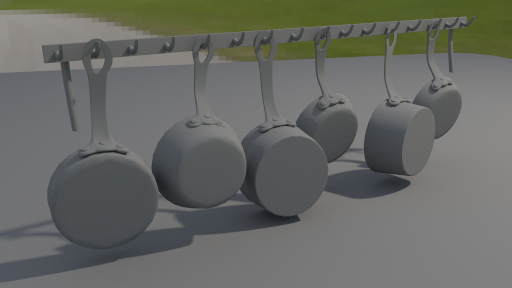
Here's a quick test of sub dividing some pots and pans from the kitchen scene in the last post:


Level 0 - 7 968 triangles

Level 1 - 31 866 triangles
Level 2 - 127 458 triangles
Level 3 - 509 826 triangles
 
-Espen

Saturday, June 1, 2013

... again!

Apparently announcing my return to the world of blogging is bad karma, so this time I'll tone it back to being cautiously optimistic. Instead, let me announce that I'm now a proud member of the Peregrine Labs rnd team. After years of doing hands on vfx it's a lot of fun bringing that experience to the software development side of the camp. It also means the re discovery of weekends, and some fresh motivation for tinkering with my own projects on the side.

While dusting off the Aurora code base, I've removed hundreds of lines of code while questioning the sanity of who ever wrote it. A couple of days later the engine now runs more than 3x faster, and I'm still ripping pieces out and replacing them with shinier ones, like this halton sequence implementation by Leonhard Grunchloss. I'm not sure exactly how much time I'll have for Aurora going forward, but I'll be sporadically updating whenever there are new things to show.

Here's a fun scene I found from an old CGTalk Lighting Challenge, modeled by Sapna Mondol:


It's a reasonably light weight and well organized scene with some good challenges, so I figured I'd try and use it as a base for further development.

Towards the top of the list are things like:
- Sub-division surfaces
- Displacement
- A brdf for metals
- And a good portion cleanup of the pre light transport pipeline.

-Espen

Saturday, November 24, 2012

I'm back!

It's been very busy at work, but I'm finally getting some time to sit down and work on Aurora again. I wrapped up my second pass at a shading engine, and as anyone coming back to a personal project after a few weeks off I'm realizing I need to spend some time on code cleanup before moving back onto more features.

The new engine now supports an arbitrary graph of shaders, which MtoAur currently parses from Maya's Hypershade and dumps into the scene description. I don't support that many nodes yet, but now that I have the framework in place that should be the easy part.

In an attempt to break the record in ray tracer cliches here's the Stanford bunny and -dragon in the Sponza model (by Marko Dabrovic):


-Espen

Saturday, October 13, 2012

Lights

Things are super busy, so I haven't had much time for Aurora updates the last couple of weeks, but I spent a morning playing around with re lighting the museum scene.

At more than 20 light sources  it's taking 16k samples per pixel to get even close to a clean result while I needed no more than 4k when it was just a couple of lights and much softer lighting, so I need to work on the light sampling logic at some point. From an interactivity point of view it's taking only about a minute to get a reasonable looking preview, though, so it's not all bad. Actually, the slowest part was exporting all the geo from Maya on every update, so I added a "lazy geo" option to the render globals in the Maya translator.

2k film res, 16 bounces and 1.5 mill polys:


-Espen

Saturday, September 29, 2012

Parsing shaders

I've done some more work on the Maya translator to support the new concept of shaders. 

A "Shader" in Aurora is responsible for prelighting only. They're somewhat atomic pieces of logic that given shading geometry and some parameters produce either a color or float (for now. I'll introduce manifolds, prim vars and other fun concepts later) which forms a virtual node graph that eventually feeds into the material properties of the "Material". The material interfaces with the integrators, and is responsible for handing over a singe BxDF during light transport. So far I've only written a texture2d shader with exr support and a noise3d shader with support for various transforms and spaces, but now that I have a generalized framework for shading they're pretty straight forward/quick to write, so I'll add a bunch more as I get time.

The Python and Maya material interface is monolithic/ubershader-style for now - I just piggy back on the existing Maya material node, and throw a bunch of my own attributes on there and parse these during scene translation. Internally it's all very modular, but while I figure out how to best parse/manage that elegantly it'll do for now. I suspect I can leverage the Hypershade in Maya, but I'll need to flesh out how to best handle it while parsing and also how to write custom nodes in Maya. Testing it out on a bigger scene it's behaving fine, but it's a pretty big impact on render times. It's nice to be able to control things interactively in Maya, though (although I haven't implemented any IPR style rendering yet rendering with only a single bounce is pretty fast).

The framework puts a clean line between prelighting and lighting allowing me to adaptively cache the former and stay unbiased. There's no caching mechanism implemented yet, though, so shaders are being re executed upwards of thousands of times more than needed.

A quick test on a medium sized scene:
1.5 mill polys, 9 light sources, multiple different materials, some with a procedural noise shader. 2048x1024 res, 8k samples per pixel and 16 light bounces. Render time was around 12h on my laptop, but it should drop considerably once I'm done with the shader cache. The lighting and material settings are pretty arbitrary, but I'm thinking I'll try and use this scene as a testing ground for my engine going forward by polishing it up a bit with textures and some proper lookdev and lighting. (Although the thought of UV mapping this beast isn't exactly intriguing..)


-Espen

Tuesday, September 25, 2012

Bring the noise


Turbulence style world space Perlin noise implementation. I still need to add the interface to this in the python API and Maya, but for now I'm having too much fun with this shading stuff to worry about pesky details like UI control.

-Espen

Monday, September 24, 2012

squares


That's right. Gone are the days of constant colored Stanford models. Textures are the new black, green, pink and orange.

I added a shading engine responsible for feeding bxdfs their coefficients, so I finally have an appropriate environment for things like texture mapping. There are a lot of features to be written, but the framework is there now so this is where the fun begins. I kinda broke my obj parser in the process of adding prim var support, so normals are back to faceted but that's all temporary. Be prepared for a bunch of updates on the  shading side.

-Espen